

Most businesses spend the design budget on the homepage. Then they send buyers to a service page that was written in an afternoon and has not been touched since.
That is backwards. A homepage introduces you. A service page is where someone decides whether to enquire. If you can only get one page right, it should be the one that answers “can you do this, and should I trust you with it?”
Why do service pages matter more than the homepage?
Search engines and AI assistants send people to the page that best matches the question. For a buyer with a specific need, that is rarely the homepage. It is the page about the exact thing they want done.
We checked our own numbers before writing this. In the 90 days to 27 October 2026, Google Search Console shows the resultsyoucanmeasure.com homepage drew 17 clicks. Our seven service pages drew none. Five of them registered impressions, at average positions between 20 and 47.
Those are small-site numbers, not a study. The pattern is the point. We had put the care into the homepage and left the pages that should close the sale thin.
So we audited all seven against the checklist below. Every one had a topic-name H1 (“Branding”, “PPC Management”) rather than a question. None had a named author, a question-shaped heading, a comparison table, an FAQ block or a visible last-updated date. They did carry Service and Breadcrumb schema, named case studies and a clear route to the contact page.
We have now fixed all seven. Each has a question-shaped H1, a named author, a short answer, a problem block, a comparison table, an FAQ block with markup and a visible update date. The PPC management page is a good one to look at. What follows is the checklist we used.
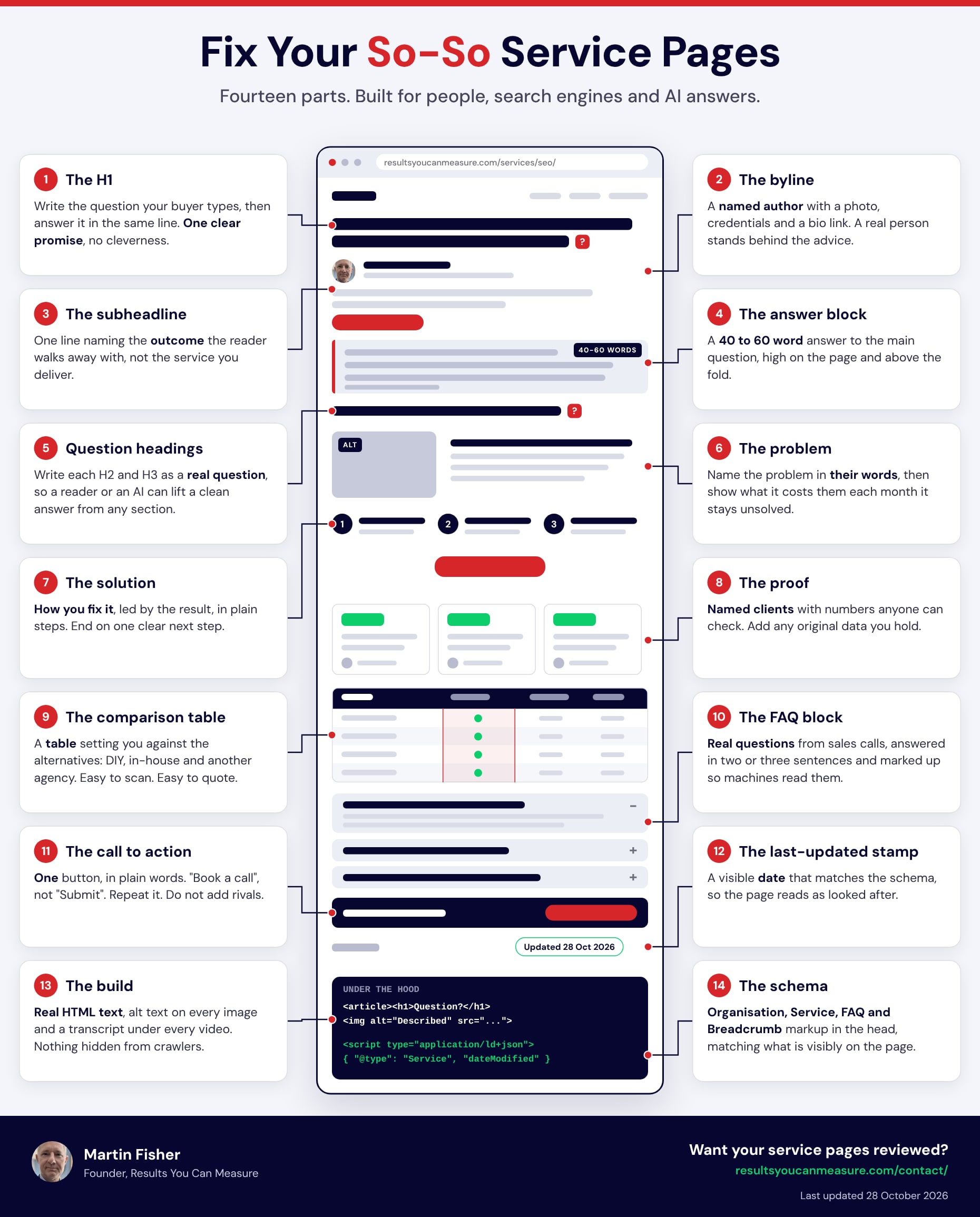
Select the image to open it full size.
What are the 14 parts of a service page that wins the enquiry?
They fall into four groups: the top of the page, the middle where you persuade, the close and what sits under the hood.
What should the top of a service page do?
1. The H1: what should it say?
Write the question your buyer would type, then answer it in the same line. “PPC management in Bradford: what it costs and what you get” beats “PPC Services”. The reader, the search engine and the AI assistant all know what the page is about before they scroll.
2. The byline: who stands behind the page?
A named author with a photo, credentials and a link to a bio. People buy services from people. A name also gives search engines a real entity to attach your claims to. Our blog posts carried a byline and our service pages did not. They do now.
3. The subheadline: what does the reader get?
One line naming the outcome, not the service you deliver. “More enquiries from the clicks you already pay for” does more than “Expert PPC management”. The reader should be able to say what they are buying after one glance.
4. The answer block: what is the 40 to 60 word answer?
Put a short, complete answer to the page’s main question high up and above the fold. A reader who stops here still gets the gist. An AI that lifts only this passage still represents you correctly.
Position matters. One study by ALM Corp found that 44% of ChatGPT citations come from the first third of a page. A page that spends three paragraphs clearing its throat gives the extractor nothing to grab.
How should the middle of a service page persuade?
5. Question headings: why should every H2 be a question?
Readers scan headings. AI assistants lift passages that sit under them. “What does PPC management cost?” followed by a direct answer is a unit that can be quoted on its own. “Our approach” is not. Our guide to getting quoted by AI search covers how to write those passages.
6. The problem block: how do you describe what the buyer is facing?
Name the problem in their words, then show what it costs them each month it stays unsolved. Take the words from sales calls, emails and reviews, not from your own service list. If a buyer would not say it out loud, do not put it in the heading.
7. The solution block: what happens once they say yes?
Lead with the result. Show the plan in three plain steps. Finish on one clear next step. This is the StoryBrand order we use for our own copy: the buyer is the hero, you are the guide and the plan removes the fear of the unknown.
8. The proof block: what counts as proof?
Named clients and numbers anyone can check. Add original data if you hold any. Researchers behind the GEO study found that adding statistics, attributed quotations and cited sources lifted visibility in AI answers by up to 40%. Proof persuades people and gets quoted by machines.
Here is what it looks like in practice. For Martin Day Electricians we built 19 service pages and 52 Leeds area pages. The case study records that the site kept its earned rankings through the move, including 3rd organically for “electrician Leeds” at the time of the audit.
9. The comparison table: how do you show the alternatives?
Set yourself against what the buyer might do instead: do it themselves, hire in-house or use another specialist. A table is easy to scan and easy for an AI to quote. Be fair to the alternatives. A table that is rigged reads like a sales sheet and loses trust.
| Compare | Do it yourself | Hire in-house | Use a specialist |
|---|---|---|---|
| Cost model | Your time and tool subscriptions | Salary and tools | A monthly fee |
| Who is accountable | You | The hire | The specialist |
| What you supply | Everything | A brief and a manager | A brief and access |
How should a service page close?
10. The FAQ block: which questions go in?
Real questions from your sales calls, answered in two or three sentences, with FAQ markup behind them.
A caution on expectations. Since August 2023 Google has shown FAQ rich results only for well-known government and health sites. Do not expect a dropdown in the results. The same post says there is no need to remove the markup. It still labels which text is a question and which is the answer, and the visible FAQ helps readers whatever the markup does.
11. The call to action: what should the button say?
One action, in plain words. “Book a call” or “Discuss your SEO strategy”, not “Submit”. Repeat the same action at the top, the middle and the end. Do not add competing buttons. A buyer who has to choose between four next steps often chooses none.
12. The last-updated stamp: why show a date?
A visible date, matched by the dateModified value in the schema, tells readers and machines that someone looks after the page. Only change it when you have changed something that matters. A stamp that lies is worse than no stamp.
What sits under the hood of a good service page?
13. The build: what must crawlers be able to read?
Real HTML text, not text baked into images. Alt text on every image. A transcript under every video. Nothing that matters hidden behind a script. If the words are not in the raw HTML, a crawler may never see them. Our web development work starts from that rule.
14. The schema: what goes in the head?
Organisation or LocalBusiness markup for who you are. Service markup for what the page offers. FAQ markup for the questions. Breadcrumb markup for where the page sits. Every item must match what is visibly on the page. Our service pages now carry Service, Breadcrumb, FAQ and WebPage markup, with a modified date that matches the date shown on the page.
Do you need all 14 on every service page?
No. Aim for most of them. If a part does not fit, drop it rather than fake it. A comparison table makes little sense for a service with no real alternatives.
We would treat the first four, the proof block, the FAQ block and one clear call to action as non-negotiable. Those do most of the work.
How can you check your own service pages in ten minutes?
- Pick the service that earns you the most revenue.
- Open its page and the infographic side by side.
- Give one point for each part that is fully there. Give nothing for half-there.
- Fix the top four first, then proof, then the FAQ.
- Move on to the next service.
As a rough rule of ours, a page scoring under seven is a brochure, not a salesperson.
If you would like a second pair of eyes on your service pages, get in touch. We will tell you which parts are missing and what to fix first.
Related services
- Web Development for pages built to be read by people and machines
- Copywriting for question-led headings, answer blocks and proof
- SEO for schema, structure and AI-ready content
FAQs
How long should a service page be?
Long enough to answer the questions a buyer asks before they call, then stop. There is no magic word count. Keep each section focused on one question.
Do I need a separate page for every service?
If a buyer would search for or ask about a service on its own, yes. One page per service lets each page answer one question well, instead of answering several badly.
Will this guarantee rankings or AI citations?
No. Nobody can guarantee either. These parts remove the things that get in the way and make the page easier to read, quote and trust.
Where should I start?
With the service that earns the most revenue. Fix the H1, add a named author, write the 40 to 60 word answer and make the next step obvious. Then work down the list.